
AeroAssist - Full-Stack Ticketing System Development
AeroAssist is a full-stack ticketing system I built to streamline ticket creation, tracking, and management. I used C#, ASP.NET, Bootstrap, and MSSQL to create a practical solution for managing support tickets.
Repository: AeroAssist on GitHub
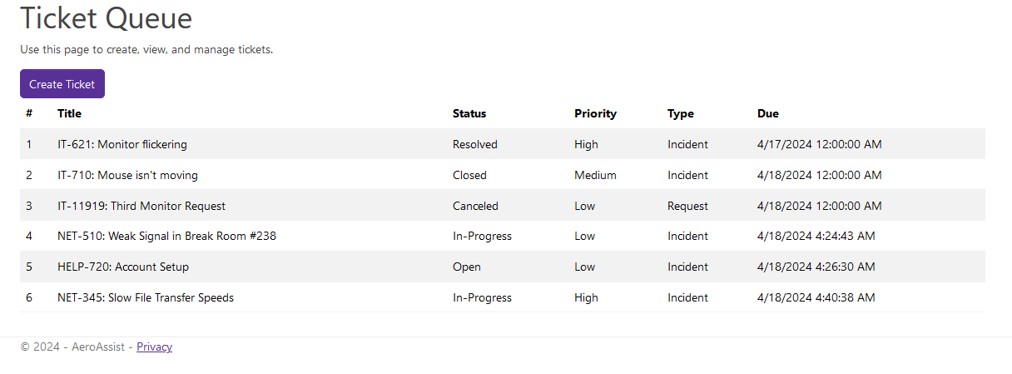
Project Overview
Ticketing systems are essential tools for organizations to manage support requests, track issues, and maintain service quality. AeroAssist was developed to provide a comprehensive solution for ticket management, incorporating user management, workflow automation, and efficient data handling.
The Problem
Organizations often struggle with:
- Inefficient ticket creation and submission processes
- Lack of visibility into ticket status and progress
- Difficulty tracking ticket history and resolution
- Manual workflow management
- Inconsistent user experience across different departments
AeroAssist solves these problems with a centralized, web-based platform for ticket management.
Technical Architecture
Frontend
- ASP.NET MVC: Server-side rendering with Razor views
- Bootstrap: Responsive UI framework for consistent design
- HTML/CSS/JavaScript: Client-side interactivity and styling
Backend
- C#: Primary programming language for business logic
- ASP.NET Framework: Web application framework
- MSSQL: Relational database for data storage and management
Key Components
- User Authentication: Secure user login and session management
- Ticket Management: Create, view, update, and track tickets
- User Management: Role-based access control and user administration
- Workflow Automation: Automated ticket routing and status updates
Key Features
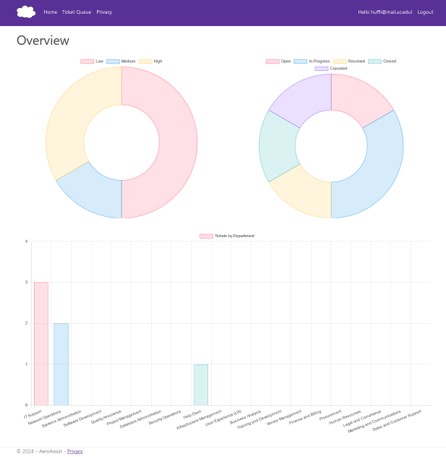
Ticket Creation and Management
- Intuitive Ticket Forms: Streamlined interface for creating new tickets
- Ticket Categorization: Organize tickets by type, priority, and department
- Status Tracking: Real-time visibility into ticket status and progress
- History Logging: Complete audit trail of ticket changes and updates
User Management
- Role-Based Access Control: Different permission levels for users, agents, and administrators
- User Profiles: Manage user information and preferences
- Team Assignment: Assign tickets to specific users or teams
Workflow Automation
- Automated Routing: Route tickets to appropriate departments based on category
- Status Transitions: Automated status updates based on workflow rules
- Notification System: Alert users of ticket updates and assignments
Reporting and Analytics
- Ticket Metrics: Track ticket volume, resolution times, and performance
- Dashboard Views: Visual representation of ticket statistics
- Export Capabilities: Generate reports for analysis
My Contributions
Development Work
- Full-Stack Implementation: Developed both frontend and backend components
- Database Design: Designed MSSQL database schema for tickets, users, and related entities
- API Development: Created controllers and services for ticket operations
- User Interface: Built responsive UI components using Bootstrap
Technical Implementation
- Authentication System: Implemented secure user authentication and authorization
- Business Logic: Developed ticket management workflows and business rules
- Data Access Layer: Created repository pattern for database operations
- Error Handling: Implemented comprehensive error handling and logging
Code Quality
- Code Organization: Structured codebase following best practices
- Documentation: Documented key components and functionality
- Testing: Implemented unit tests for critical functionality
Technical Challenges
Database Design
Challenge: Designing a flexible database schema that supports various ticket types and workflows.
Solution: Created normalized database structure with proper relationships, indexes, and constraints to support efficient queries and data integrity.
User Interface Responsiveness
Challenge: Ensuring the application works well across different devices and screen sizes.
Solution: Leveraged Bootstrap's responsive grid system and components to create a mobile-friendly interface.
Workflow Automation
Challenge: Implementing flexible workflow rules that can adapt to different organizational needs.
Solution: Designed a configurable workflow system that allows administrators to define routing rules and status transitions.
Technologies Used
- C#: Object-oriented programming language for backend development
- ASP.NET: Web application framework for building web applications
- MSSQL: Microsoft SQL Server for relational database management
- Bootstrap: Frontend framework for responsive UI design
- Entity Framework: ORM for database operations (if used)
- Git: Version control for code management
Getting Started
To set up AeroAssist locally:
- Clone the repository
- Open in Visual Studio or Rider
- Restore NuGet packages
- Create an SQL Server database named "AeroAssist"
- Install Entity Framework Core tools
- Apply migrations
- Configure connection strings in
appsettings.json - Run the application
API Documentation
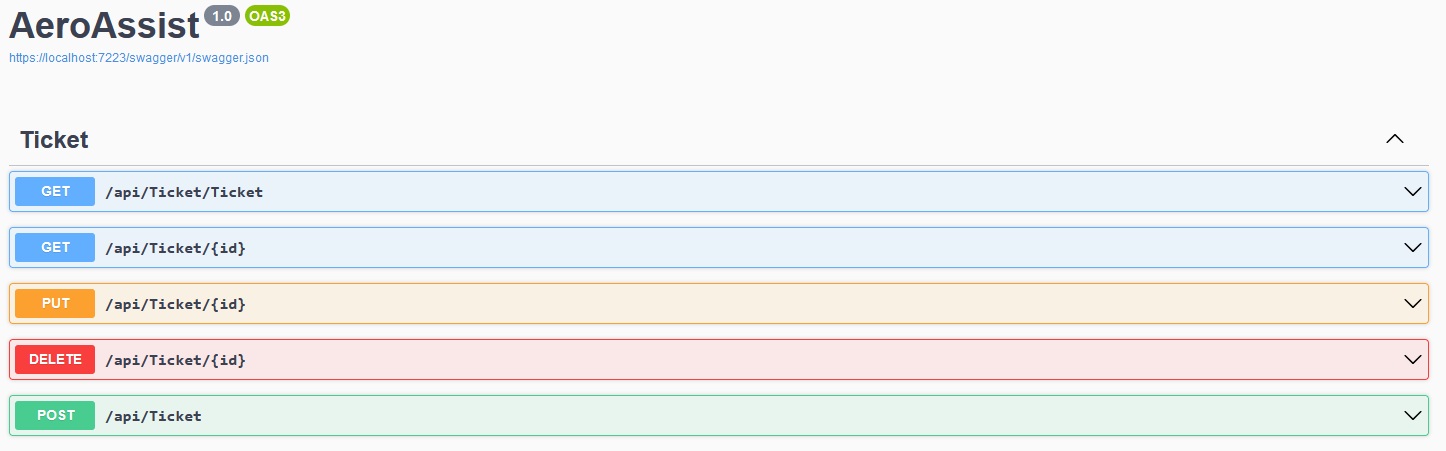
Swagger OpenAPI documentation is available at /swagger for exploring and testing API endpoints.
Project Structure
The application follows a standard ASP.NET MVC structure:
- Models: Data models and business entities
- Views: Razor views for UI presentation
- Controllers: Request handling and business logic
- Services: Business logic and data access
- Data Access: Database operations and repositories
Learning Outcomes
This project provided valuable experience in:
- Full-stack web development with Microsoft technologies
- Database design and management with MSSQL
- User authentication and authorization implementation
- Workflow automation and business logic development
- Responsive web design with Bootstrap
- Software architecture and code organization
Real-World Application
Ticketing systems like AeroAssist are used in various contexts:
- IT support departments
- Customer service centers
- Help desk operations
- Project management
- Issue tracking and resolution
The skills developed in this project translate directly to professional software development roles that require full-stack capabilities and understanding of business process automation.
Future Enhancements
Potential improvements include:
- Real-time notifications using SignalR
- Advanced reporting and analytics dashboard
- Integration with email systems for ticket creation
- Mobile application for ticket management
- API development for third-party integrations
- Advanced search and filtering capabilities
- SLA tracking and management
Conclusion
AeroAssist shows how I applied full-stack development skills to build a practical ticketing system. The project uses C#, ASP.NET, and MSSQL to solve real operational problems.
Building this app gave me experience with enterprise web development tools and showed me how important user experience, data integrity, and workflow efficiency are in software design.
For more information about the project, visit the AeroAssist repository on GitHub.