
LocoQuest - Android Geolocation Scavenger Hunt Application
LocoQuest is an Android app I built that uses geolocation to create an interactive scavenger hunt. I built it with Kotlin and the Android SDK. The app guides users to real-world benchmarks and landmarks, turning exploration into a game.
Repository: LocoQuest on GitHub

Project Overview
LocoQuest turns traditional scavenger hunts into a digital, location-based experience. Users get quests that guide them to specific locations where they can find benchmarks, landmarks, or points of interest. The app uses GPS to track location and provide navigation.
The Problem
Traditional scavenger hunts and location-based activities face several limitations:
- Lack of real-time location tracking
- Difficulty verifying user presence at target locations
- Limited interactivity and feedback
- No persistent record of completed quests
- Challenges in organizing and managing multiple quests
LocoQuest solves these problems with a digital platform that combines GPS navigation, location verification, and game-like elements.
Technical Architecture
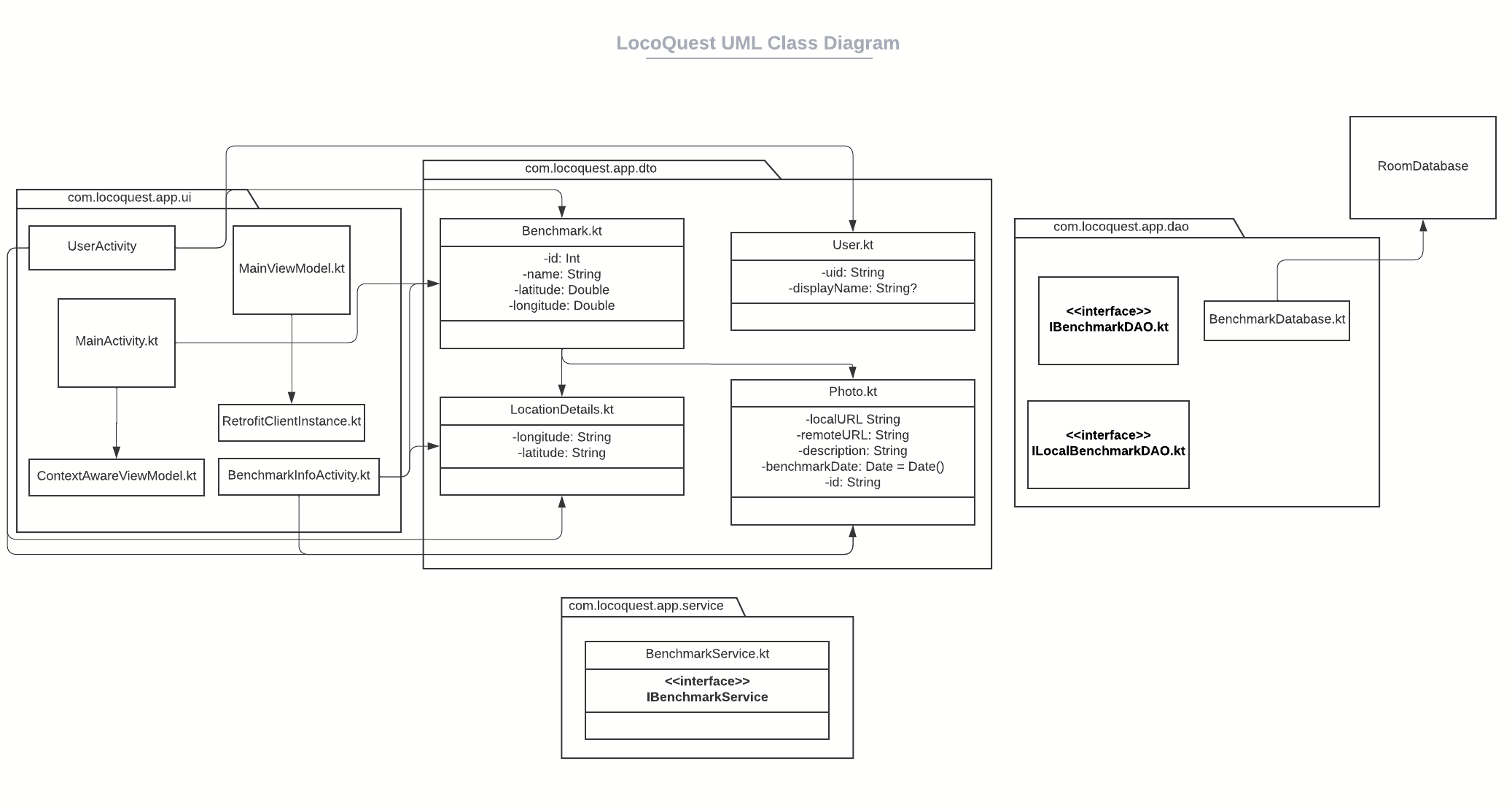
Mobile Platform
- Kotlin: Modern programming language for Android development
- Android SDK: Native Android application development
- Android Studio: Integrated development environment
Core Technologies
- Geolocation APIs: GPS and location services for position tracking
- Google Maps Integration: Mapping and navigation capabilities
- Location Services: Background location tracking and geofencing
- Local Storage: SQLite database for quest data and user progress
Key Components
- Location Manager: Handles GPS and network-based location services
- Quest System: Manages quest creation, tracking, and completion
- Navigation Module: Provides directions and route guidance
- User Interface: Native Android UI components and Material Design
Key Features
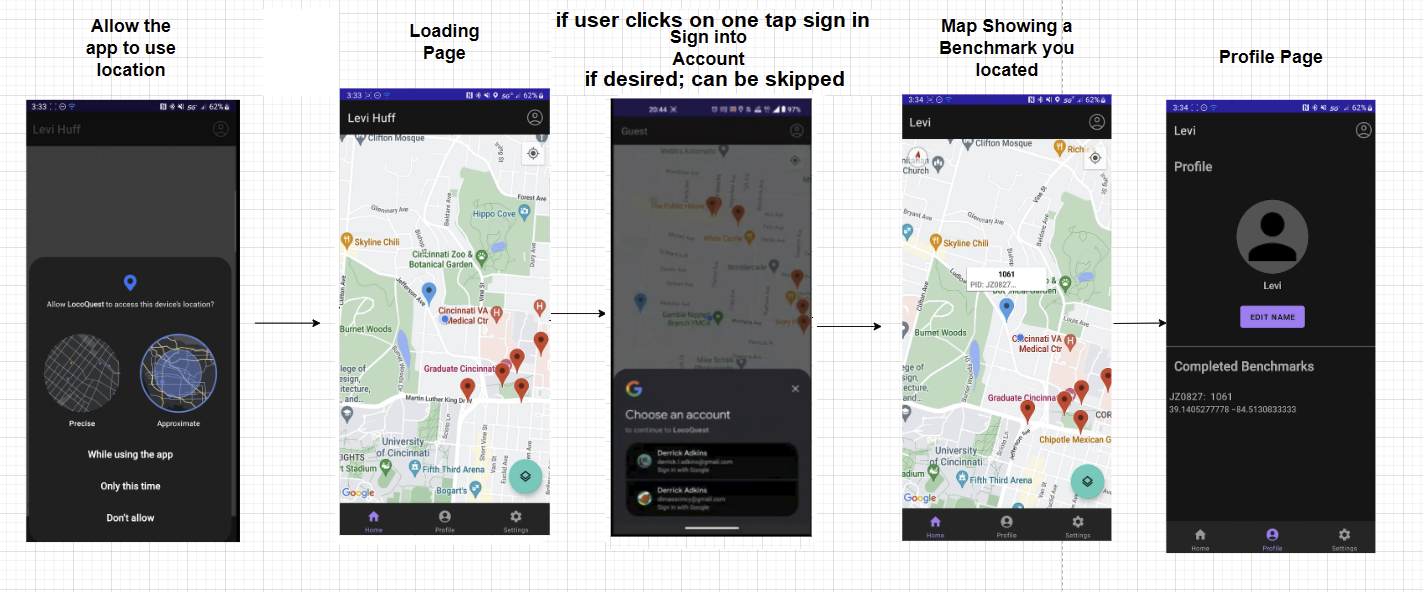
Geolocation and Navigation
- GPS Tracking: Real-time location tracking using device GPS
- Route Guidance: Turn-by-turn directions to quest locations
- Distance Calculation: Real-time distance to target locations
- Location Verification: Confirms user arrival at quest destinations
Quest System
- Quest Discovery: Browse available quests in the area
- Quest Details: View information about benchmarks and landmarks
- Progress Tracking: Monitor completion status of active quests
- Quest History: Record of completed quests and achievements
User Experience
- Interactive Maps: Visual representation of quest locations
- Notifications: Alerts when approaching quest locations
- Offline Capability: Basic functionality without constant internet connection
- User Profiles: Track statistics and achievements
Benchmark Database
- Real-World Benchmarks: Database of survey markers and landmarks
- Location Information: Details about each benchmark
- Categorization: Organize benchmarks by type or region
My Contributions
Development Work
- Android Application Development: Built native Android app using Kotlin
- Geolocation Implementation: Integrated GPS and location services
- UI/UX Design: Created intuitive user interface for quest navigation
- Database Design: Implemented local storage for quest data
Technical Implementation
- Location Services: Configured and managed GPS location tracking
- Permission Handling: Implemented runtime permissions for location access
- Background Services: Created services for location tracking
- Map Integration: Integrated mapping functionality for navigation
Code Quality
- Kotlin Best Practices: Utilized modern Kotlin features and idioms
- Android Architecture: Followed Android development best practices
- Error Handling: Implemented robust error handling for location services
- Performance Optimization: Optimized battery usage and location accuracy
Technical Challenges
Location Accuracy
Challenge: Ensuring accurate location detection, especially in areas with poor GPS signal.
Solution: Implemented hybrid location services using both GPS and network-based location, with accuracy thresholds and fallback mechanisms.
Battery Optimization
Challenge: Location tracking can significantly drain device battery.
Solution: Implemented efficient location update strategies, using appropriate update intervals and location request priorities based on app state.
Permission Management
Challenge: Handling Android runtime permissions for location access, which requires user approval.
Solution: Created a comprehensive permission request flow that explains the need for location access and handles permission denial gracefully.
Offline Functionality
Challenge: Providing core functionality when internet connectivity is limited.
Solution: Implemented local database storage for quest data and cached location information, allowing basic functionality without constant connectivity.
Technologies Used
- Kotlin: Modern programming language for Android development
- Android SDK: Native Android development framework
- Location Services: Android LocationManager and Fused Location Provider
- Google Maps SDK: Mapping and navigation services
- SQLite: Local database for quest storage
- Material Design: Android UI design guidelines
- Git: Version control for code management
Android Development Concepts
This project demonstrated proficiency in:
- Activity Lifecycle: Managing Android activity states
- Services: Background location tracking services
- Permissions: Runtime permission handling
- Location APIs: GPS and network-based location services
- Database Operations: SQLite database management
- UI Components: Android views and layouts
- Intents: Navigation between activities
Real-World Applications
Location-based applications like LocoQuest have various use cases:
- Educational field trips and location-based learning
- Tourism and exploration apps
- Geocaching and treasure hunt games
- Fitness and outdoor activity tracking
- Location-based marketing and engagement
Learning Outcomes
This project provided valuable experience in:
- Native Android application development
- Kotlin programming language
- Mobile UI/UX design
- Geolocation and mapping technologies
- Mobile app architecture and best practices
- Battery optimization for mobile applications
- Handling device permissions and user privacy
Future Enhancements
Potential improvements include:
- Social features for sharing quests and achievements
- Augmented reality integration for enhanced location discovery
- Multiplayer quests and team challenges
- Integration with social media platforms
- Advanced analytics and user statistics
- Cloud synchronization for quest data
- Custom quest creation by users
- Integration with fitness tracking apps
Mobile Development Best Practices
Key practices implemented in this project:
- Battery Efficiency: Optimized location updates to minimize battery drain
- Privacy: Clear permission requests and transparent data usage
- Performance: Efficient data structures and algorithms
- User Experience: Intuitive navigation and clear feedback
- Error Handling: Graceful handling of location service failures
- Accessibility: Support for accessibility features
Conclusion
LocoQuest shows how I applied mobile development skills to build a location-based app. The project uses Kotlin, Android SDK, and geolocation technologies to solve real challenges in mobile development.
Building this app taught me about native Android development, location services, and mobile UI design. It also showed me how important battery optimization, user privacy, and performance are in mobile apps.
The skills I learned here apply directly to professional mobile development work and show I can build location-aware apps that are useful to users.
For more information about the project, visit the LocoQuest repository on GitHub.