
Spend enough time with an AI assistant and you stop starting from zero. It learns that I work in Windows imaging and PowerShell, that my answers should lead with the answer, that I run a homelab on Proxmox and Docker, that I want code reviewed adversarially instead of praised. None of that was one prompt. It accumulated over months of corrections. It is real value, and it is the one asset I build inside these tools that I cannot git clone when I leave.
So I went looking for the export button. There isn’t one that matters.
The headline of this post: the memory features are proprietary and they do not move. The portable copy is a markdown file I keep myself. Each platform’s built-in memory then becomes a cache of that file — convenient inside the session, disposable, and rebuildable any time by pasting the file back in — instead of the place my context actually lives. Lose the cache or switch tools and nothing important is gone, because the canonical copy was never in the platform to begin with. This is the build log of moving my context between ChatGPT, Claude, and Gemini, and of the separate, file-based setup I run for Claude Code in the terminal.
Context lock-in is the actual problem
#Every assistant now keeps memory, and every one keeps it differently. Claude remembers across chats. ChatGPT has its own memory. Gemini has its own. Each store is opaque, scoped by rules I do not control, and editable only through that vendor’s settings panel. There is no shared format, and there is no clean handoff. The memory I spent months shaping is genuine equity, and it is parked in an account I do not own the data layer of.
That is context lock-in, and it is a quieter kind of lock-in than file formats or proprietary APIs. Nobody is stopping me from leaving. The friction is that leaving means re-teaching the next assistant everything the last one already knew, by hand, one correction at a time. The switching cost is not a contract. It is the contextual equity itself, sitting in a store that does not come with you.
The fix is not to find a better memory feature. It is to stop treating any of them as the source of truth.
The manual import dance
#What I have actually done is walk my context down a chain: first ChatGPT’s memory into claude.ai, then claude.ai’s memory into Gemini. There is no migration tool at any hop. Each move is the same three manual steps, and naming them is most of the value.
Audit. Find the raw memory in the source platform. In each of these apps the stored memory is viewable as text in settings — a list of bullet-point facts the platform decided to keep about me. Read the whole thing. Half of it is stale or trivial, and the audit is where you notice that.
Extract. Copy the markdown snapshot out. It comes out as bullet soup, because that is how these stores think: a flat pile of facts with no structure and no priority.
Translate. Paste it into the target’s custom-instructions or system-prompt slot, rewritten so the new model can actually use it. This is the step that is real work, because a memory store and a system prompt are not the same kind of object. A memory store is a pile of facts the platform chose to retain. A system prompt is an instruction I author. Moving one to the other means deciding what still matters and rewriting it as direction.
Here is the shape of it. The raw export looks like this:
- User is a developer with an IT/infrastructure background.
- Uses Windows imaging and PowerShell at work.
- Prefers concise answers.
- Working on a personal site called levihuff.net built with Eleventy.
- Likes adversarial code review.
- Runs a homelab.
The translated custom-instructions block looks like this:
# About me
IT and infrastructure background. Daily work is Windows imaging,
Active Directory, and PowerShell automation. I run a homelab on
Proxmox and Docker, and a personal Eleventy static site (levihuff.net).

# How to work with me
- Be concise. Lead with the answer, then the reasoning.
- Review adversarially: hunt for bugs and edge cases, do not validate.
- Assume Node tooling for anything touching the site.
Same facts, different object. The bullets became a profile with a point of view about how the assistant should behave, which is the form a new model can take direction from. The translation is not mechanical, and that is exactly why no vendor ships a button for it.
Claude Code is a different problem, with a better answer
#The assistant in my terminal does not use any of that. Claude Code’s memory is files on disk, which is the entire reason it does not have this problem. Files move. There are three layers, all plain markdown, all local, all in or next to git.
The first is the global workflow at ~/.claude/CLAUDE.md, loaded at the start of every session. It is where the multi-model setup from rebuilding my dev setup with three LLMs is written down — the model-roles table that decides which provider gets which job:
| Model              | Role |
|--------------------|------|
| Claude Code        | Orchestrator: planning, writing, refactoring, docs |
| Codex (`!codex`)   | Adversarial reviewer: bug hunting, second opinions |
| Gemini (`!gemini`) | Large-context specialist: full-repo reads, multimodal |
That table is portable by definition. It is a file. It is the same discipline I described in spending the Fable window, where matching the task to the right model only works if the routing rules live somewhere I control.
The second layer is per-project memory at ~/.claude/projects/<project>/memory/ — a MEMORY.md index plus one file per fact, each with frontmatter that says what kind of fact it is:
---
name: levi-prefers-adversarial-review
description: How Levi wants code and plans reviewed
metadata:
  type: user | feedback | project | reference
---
An honest detail: for this site that directory exists but is currently empty. The facts that matter for levihuff.net live one layer up in the global profile and one layer over in the vault, so the per-project store has nothing in it yet. Empty is fine. The schema is the point — when a project-specific fact does show up, there is a typed, version-controlled slot waiting for it instead of an opaque store I have to trust.
The third layer is the second brain: an Obsidian vault at ~/.claude/vault/wiki, driven by the claude-obsidian plugin, which is built on Andrej Karpathy’s idea of an LLM-maintained wiki. I ran Claude inside the .claude folder and let its autoresearch loop crawl levihuff.net and file what it found into the vault as linked notes. Here is the actual graph it produced:
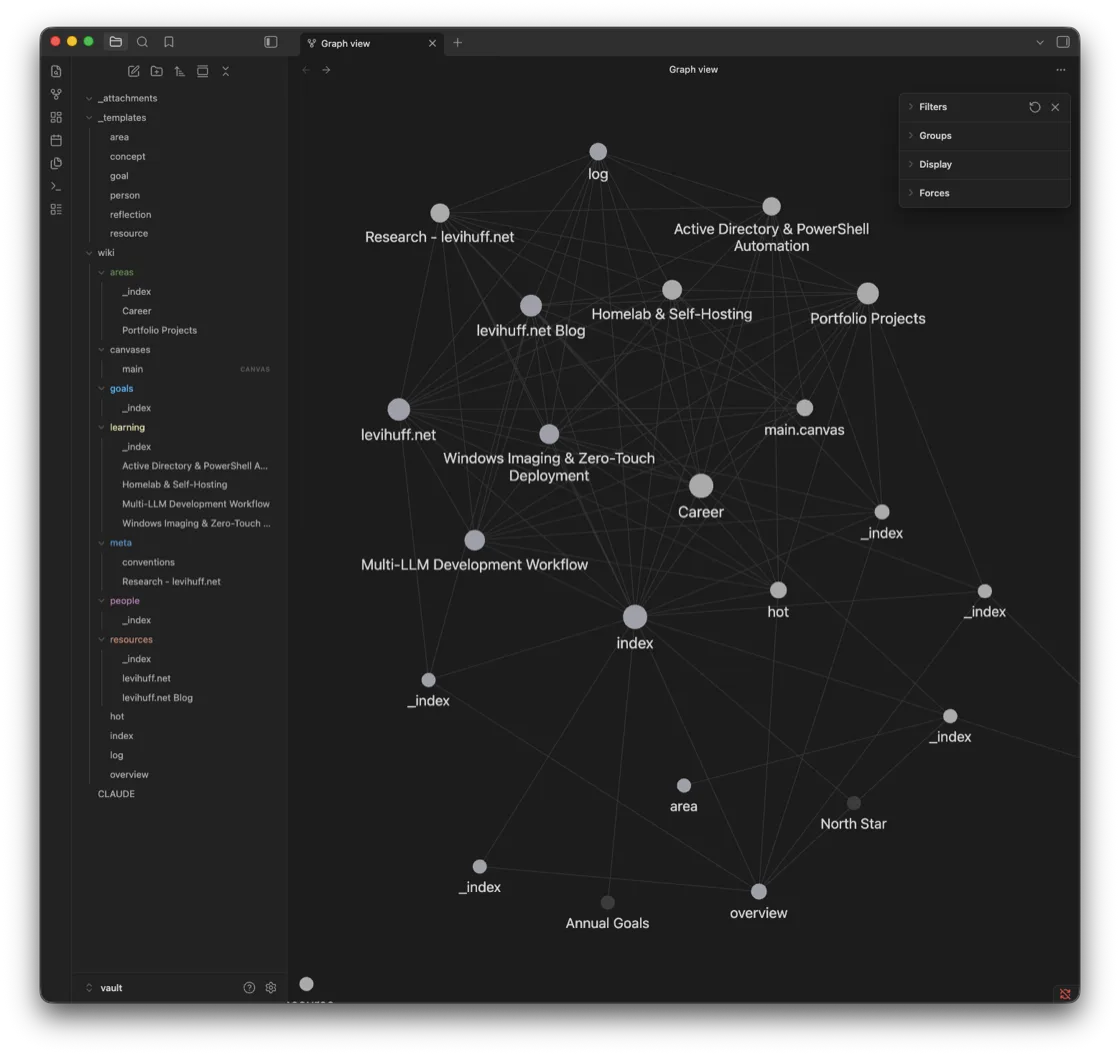
Every node is a markdown file the loop wrote or cross-linked — areas/, goals/, learning/, resources/, people/, plus a rolling hot.md cache, an index.md catalog, and an append-only log.md. The rules it files under are themselves a checked-in file, meta/conventions.md:
- All notes use YAML frontmatter: type, status, created, updated, tags.
- Wikilinks use [[Note Name]] — filenames are unique, no paths.
- wiki/index.md is the master catalog — update on every ingest.
- wiki/hot.md is overwritten each update — keep under 500 words.
Select the index note and the structure under the web becomes obvious — it is the hub every other note links back to, exactly as that convention demands:
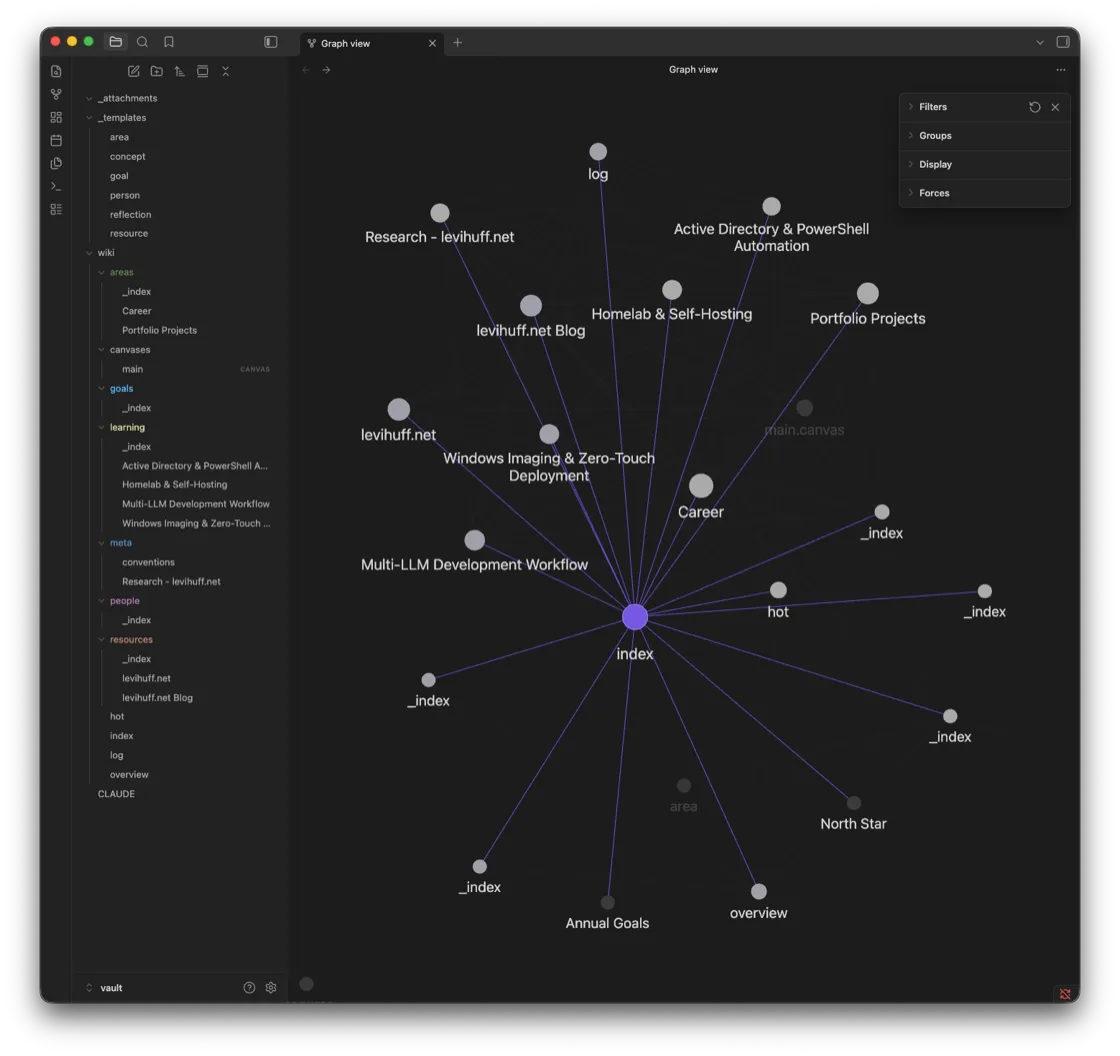
The common thread across all three layers is that none of them is a feature I rent. They are directories I own, full of text any editor can read. If I switch agents tomorrow, the knowledge does not evaporate with the account — it is still sitting there as markdown, the same way my saved Reddit index stayed mine by living in a local store instead of a closed API.
What didn’t work
#The vault did not file itself the way I wanted on the first pass. I had picked a layout going in — a PARA-flavored structure with areas, goals, learning, and resources kept distinct — and claude-obsidian’s autoresearch was not built around that choice. Left to its defaults, it produced a generic structure: reasonable, but not mine. Notes landed in the wrong folders, and the organizing scheme it reached for was the tool’s opinion, not the one I had set at initialization.
The fix was not clever. I had to steer Claude toward my layout explicitly, correct where things were filed, and treat the autoresearch output as a draft to reorganize rather than a finished vault. It worked, but only because I went in and imposed the structure.
The lesson generalizes past this one plugin. Open formats are necessary for portability, but they are not sufficient. Markdown in folders I own is what makes the knowledge movable. It is not what makes the knowledge organized. Every memory tool — the consumer apps, the agent, the vault — carries an opinion about where things go, and that opinion is the part that does not travel. The format is yours by default. The structure only becomes yours when you impose it.
Key takeaways
#- Own the markdown, rent the memory. The canonical copy of who you are and how you work should be a file you control. Every platform’s built-in memory is a cache of that file, never the source of truth.
- Export is an audit, not a button. There is no migration tool between assistants. Moving context is three manual steps — audit the stored facts, extract the raw markdown, translate it into the target’s instruction format.
- A memory store and a system prompt are different objects. One is a flat pile of facts; the other is authored direction. The translation between them is judgment, which is exactly why no vendor ships it.
- Agent memory beats chat memory because it is files. Claude Code’s three layers — global
CLAUDE.md, per-projectmemory/, and the Obsidian vault — are portable because they are directories, not features. - Open format is not the same as your structure. Markdown makes knowledge movable. It does not make it organized. The tooling’s default layout is the one thing that will not travel, so impose your own.
Conclusion
#I did not find an export button, and I have stopped looking for one. The platform-specific memory is convenience — useful inside the session, fine to let the vendor keep. The thing I actually depend on is a set of markdown files in directories I own: a profile I can paste into any assistant’s instructions, a model-roles table loaded every session, and a vault that holds what I have taught the tools about my own work.
The assistants will keep changing. The good one this year is not guaranteed to be the good one next year, and the memory features will stay incompatible because incompatibility is the point of them. None of that touches the files. When I switch, the import is a copy, a paste, and an afternoon of translation — not a year of re-teaching. That is the whole difference between renting your context and owning it.