AeroAssist brings support requests into a shared ticket queue: create a ticket, record its priority and status, then open it to edit or delete it. I built the web interface, API, and persistence layer, and later added Docker deployment configuration.
- Skills demonstrated: C# web development, HTTP APIs, relational persistence, data visualization, and container configuration.
- Stack: ASP.NET Core 8, Razor Pages, Entity Framework Core 8, SQL Server, Bootstrap 5, and Chart.js.
- My role: The repository’s recorded authors all resolve to my GitHub identity,
lh1207. My contribution examples below link to commits. - Status: Portfolio project with existing application screenshots; the current container setup needs validation before a live demo.
Explore the source on GitHub · My contributions · Run locally
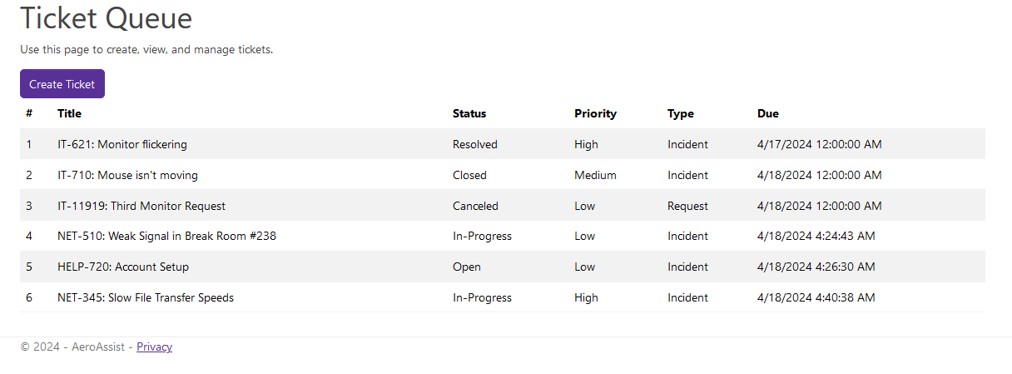
The repository screenshot shows the queue with sample requests. Images on this page are existing project assets, not a newly captured demo.
What the application does
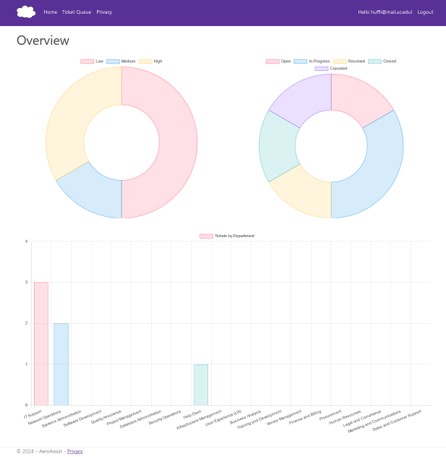
#The queue makes each request’s status, priority, type, and due date visible in one place. Ticket forms capture descriptions, assignment details, departments, and resolution information. A REST API exposes create, read, update, and delete operations. Chart.js groups tickets by status, priority, and department.
ASP.NET Identity is integrated for accounts, with optional Microsoft sign-in configuration. This does not establish complete role-based access control or production readiness.
My contributions
#The commit history records my work across the application:
- Ticket workflow: I connected Razor forms and JavaScript to create, update, and delete operations. CRUD interface commit.
- Data access: I added EF migrations and database-backed service operations. The early implementation used SQLite; the current application uses SQL Server. Persistence commit.
- Visualization and forms: I implemented charts and organized shared ticket-form JavaScript. Charts and forms commit.
- Deployment: I added a multi-stage Docker build, a SQL Server Compose service, and environment-driven configuration. Docker support PR.
How the pieces connect
#The UI and API live in one ASP.NET Core application. Razor page models call the ticket API over HTTP; the controller delegates database operations to TicketService.
Browser
  |
Razor Pages + Bootstrap
  | HTTP
TicketController REST API
  |
TicketService
  |
AeroAssistContext (EF Core)
  |
SQL Server
Chart.js also fetches ticket data from the API in the browser. Identity uses the same EF context for account data. See Program.cs, page models, and TicketService.
Technical decisions and tradeoffs
#Connecting UI and API. The HTTP boundary gives the Razor interface and Swagger a common API. It also means the UI needs a reachable API base address. Docker configuration sets the server-side client address to the app’s service name.
Moving beyond a ticket list. The overview summarizes tickets by priority, status, and department. Its browser scripts still hardcode a localhost API address, so charts need follow-up work for container or remote use.
Packaging dependencies. Compose defines the app and SQL Server, database health checks, a persistent volume, and optional startup migrations. This captures deployment requirements, but does not prove the stack runs on every host.
Run locally
#The repository supplies Docker and manual .NET setup paths. For the container path, use a Docker host compatible with the SQL Server image:
git clone https://github.com/lh1207/AeroAssist.git
cd AeroAssist
cp .env.example .env
# Set your own strong SA_PASSWORD in .env before starting.
docker compose up --build -d
docker compose logs
The configured app address is http://localhost:8080, with API documentation at /swagger. Stop with docker compose down; the database volume remains.
Validation boundary: This website review checked source and configuration at dff52cb, not a successful fresh run. The Docker daemon and .NET SDK were unavailable. The app health check invokes curl, which the Dockerfile does not install; verify its availability before relying on container health. A build/test workflow exists, but no test project is committed.
For configuration details and manual setup, see the deployment notes.
Next improvements
#- Make chart API URLs deployment-independent and validate a fresh container startup.
- Add automated coverage for ticket CRUD and persistence.
- Review endpoint authorization and deployment defaults before public hosting.