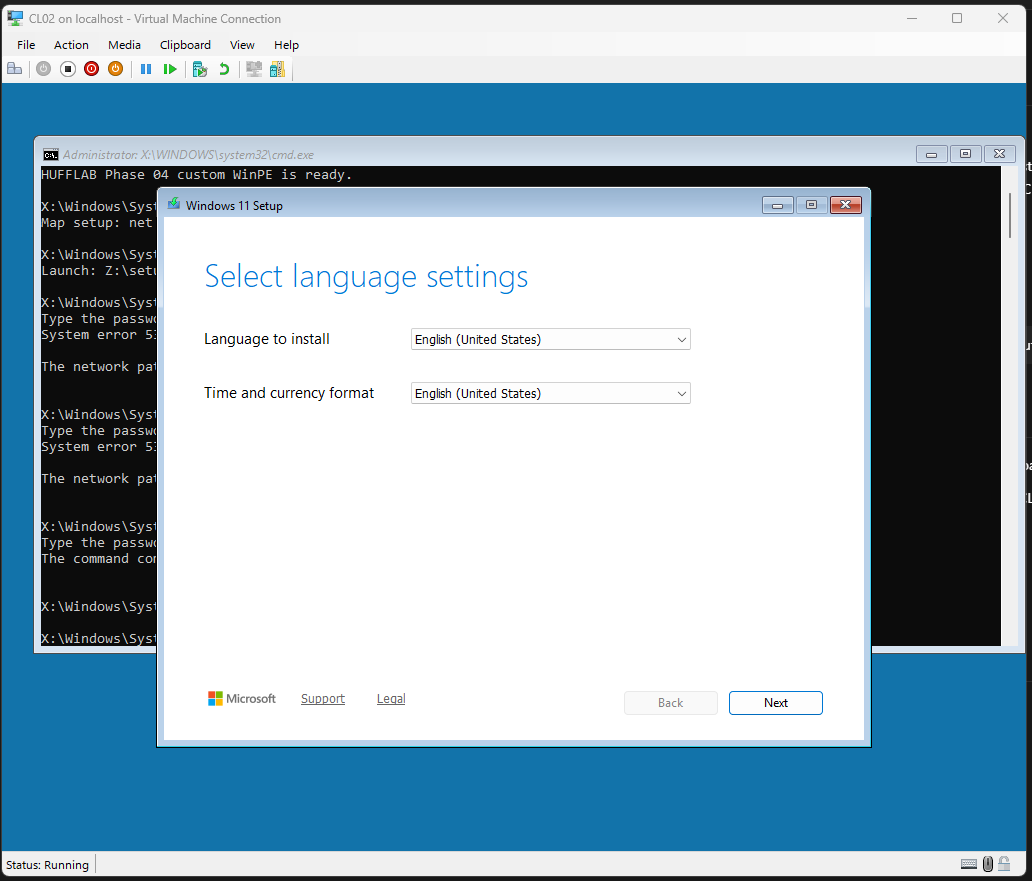
I am building an isolated Hyper-V lab to practice the Windows deployment work that sits between a blank virtual disk and a usable domain workstation. The larger plan covers Active Directory Domain Services, Group Policy, Windows Deployment Services, golden-image capture, and Configuration Manager. Phase 4 reached the first complete deployment boundary: a Windows 11 Enterprise client delivered through PXE, joined to the domain, placed in the intended organizational unit, and verified with a normal domain-user sign-in.
That result sounds simple when reduced to one sentence. The useful part was everything required to make the sentence true.
The implementation, evidence, and runbooks are public in the ad-pxe-lab repository. The Phase 4 work was reviewed and merged in PR #5.
The lab has explicit role boundaries
#The lab runs on an internal Hyper-V switch using 10.0.100.0/24. Its core systems have narrow responsibilities:
DC01provides Active Directory Domain Services, DNS, and DHCP at10.0.100.10.WDS01provides the Phase 4 PXE and TFTP path at10.0.100.20.CL02is the blank Generation 2 client deployed in this phase.CM01,CL01, andREF01remain powered off until later phases need them.
The forest is hufflab.internal, and workstations belong in OU=Workstations,OU=HUFFLAB. Keeping the roles separate makes the network easier to reason about and preserves an important rule: the subnet has one active PXE responder.
WDS01 owns that role during the WDS phases. Configuration Manager will take it later, but only after WDS01 is disabled and powered off and a negative PXE test proves that the old responder is gone.
Current Windows 11 support changed the deployment design
#My original plan treated standalone WDS as both the PXE transport and the Windows install-image service. That model no longer fits Microsoft’s current Windows 11 support boundary. A stock boot.wim from current Windows installation media does not provide a supported end-to-end standalone WDS deployment path for Windows 11.
I revised the design instead of forcing the older workflow:
- WDS delivers one custom x64 ADK Windows 11 WinPE boot image over PXE and TFTP.
- WinPE initializes networking and prompts for credentials rather than storing them in the image.
- The operator maps the read-only
\\WDS01\Win11Sourceshare. - Normal Windows Setup launches from that network source.
WDS contains zero install images. Its job is to get a controlled preinstallation environment onto the client. The SMB share then provides the complete Windows 11 Enterprise Evaluation source.
This split is less magical than a single WDS wizard, which is an advantage. The transport, credentials, source media, and installation process have distinct boundaries that can be inspected independently.
Same-subnet PXE did not need DHCP shortcuts
#DC01 and WDS01 share the client subnet, so I left DHCP options 60, 66, and 67 unset. Those options are often copied into PXE troubleshooting guides, but hardcoding a boot server and boot filename was not appropriate for this same-subnet, single-responder design.
The final DHCP scope exposed only the intended values:
- option 003 for the router
- option 006 for DNS servers
- option 015 for the DNS domain name
- option 051 for the lease duration
Lease duration is its own DHCP option. It is not part of the 003, 006, and 015 network identity settings, even though they appear together in scope output.
Avoiding PXE-specific DHCP options also kept ownership clear. DC01 handed out network configuration. WDS01 answered the PXE client. I could test each service without asking one server to impersonate the other.
Generation 2 boot exposed a recursive dispatch failure
#The first difficult failure appeared after the client received a PXE response. The Generation 2 UEFI path failed with 0xc0000704, which maps to STATUS_RECURSIVE_DISPATCH.
The cause was a subtle WDS boot-program configuration. Pointing both the normal x64 UEFI boot program and the N12 path at wdsmgfw.efi caused the process to dispatch back into itself.
The working split is:
BootProgram:    Boot\x64\wdsmgfw.efi
N12BootProgram: Boot\x64\bootmgfw.efi
I also disabled the WDS TFTP variable-window extension and set ramdisktftpvarwindow No in both relevant x64 BCD stores. The repository now includes scripts/04-Repair-WdsPxe.ps1 to reproduce the signed-file synchronization, boot-program split, BCD repair, and verification instead of leaving the recovery as terminal history.
This was the most reusable lesson from the phase. A PXE client receiving an address does not prove the boot chain is correct. DHCP, WDS policy, UEFI boot files, BCD values, and TFTP behavior are separate checkpoints.
The client still had to satisfy Windows 11
#CL02 is a Generation 2 virtual machine with two processors, an 80 GB system disk, Secure Boot using the MicrosoftWindows template, and an enabled virtual TPM. The vTPM requirement surfaced during deployment and had to be corrected at the Hyper-V layer before Windows Setup could proceed.
Once the custom WinPE image loaded, I mapped the setup source with a secure password prompt and launched Setup:
net use Z: \\10.0.100.20\Win11Source /user:HUFFLAB\Administrator *
Z:\setup.exe
The asterisk matters. It prompts for the password without embedding a credential in the WinPE image, a script, or the repository.
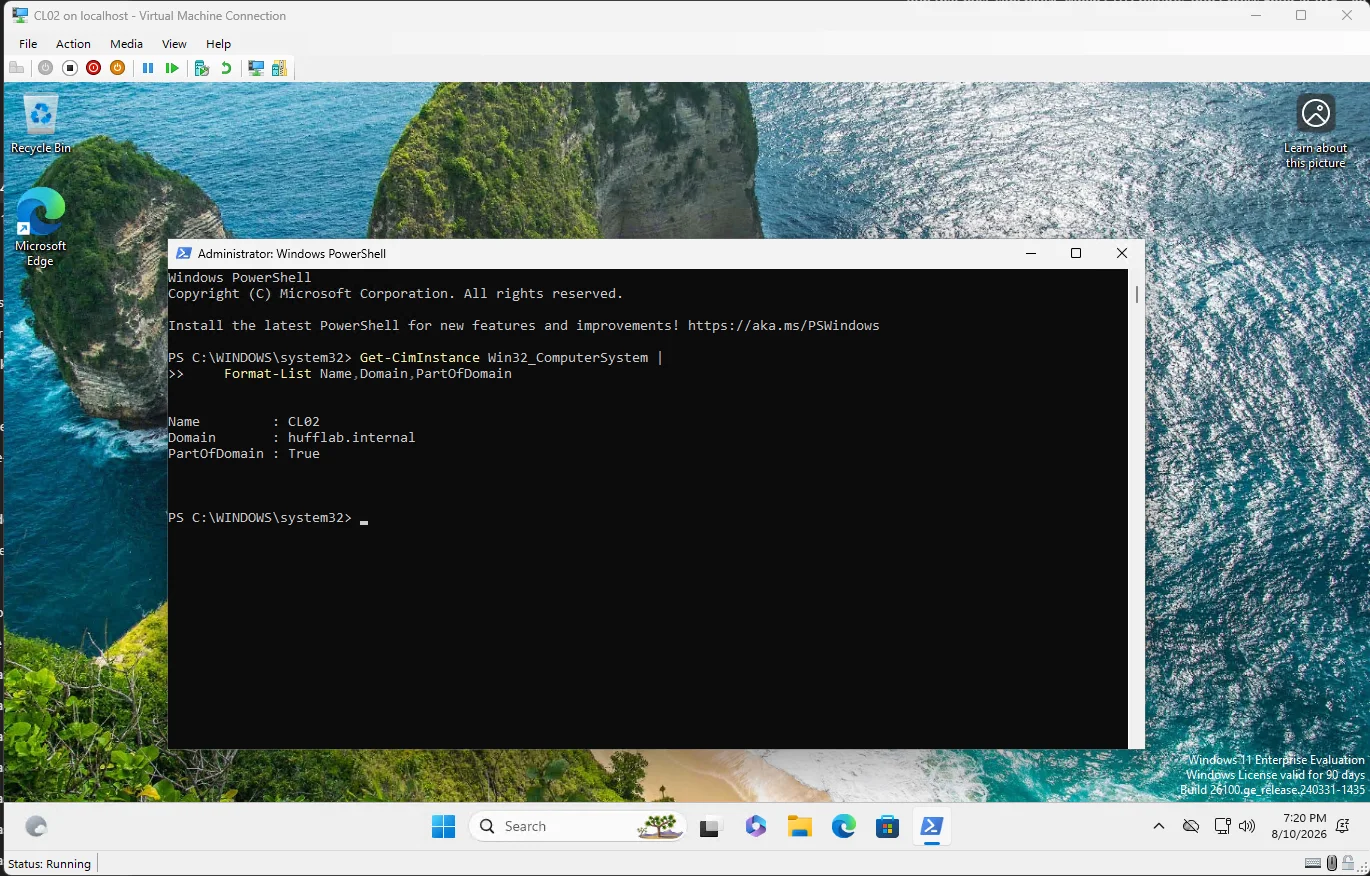
After installation, CL02 joined hufflab.internal, used DC01 at 10.0.100.10 for DNS, and moved to the Workstations OU. I then signed in interactively as HUFFLAB\lhuff to prove that the result was more than a computer object created by an administrator.
A final gate made the phase auditable
#I did not treat a successful desktop login as the finish line. The final PowerShell transcript gathered the state of WDS01, DC01, CL02, and the Hyper-V host into one acceptance record.
The gate verified that:
- the WDS role and service were installed and running
- the exact custom WinPE image was enabled
- WDS held zero install images
- the Windows Setup share existed with read-only domain access
- DHCP had the expected options and none of the forbidden PXE options
- CL02 was in the exact Workstations OU
- Windows 11 Enterprise Evaluation was joined to the domain with a healthy secure channel
- DNS pointed to DC01
- vTPM, Secure Boot, and the 80 GB disk met the client requirements
The transcript ended with PHASE 04 FINAL GATE: PASS.
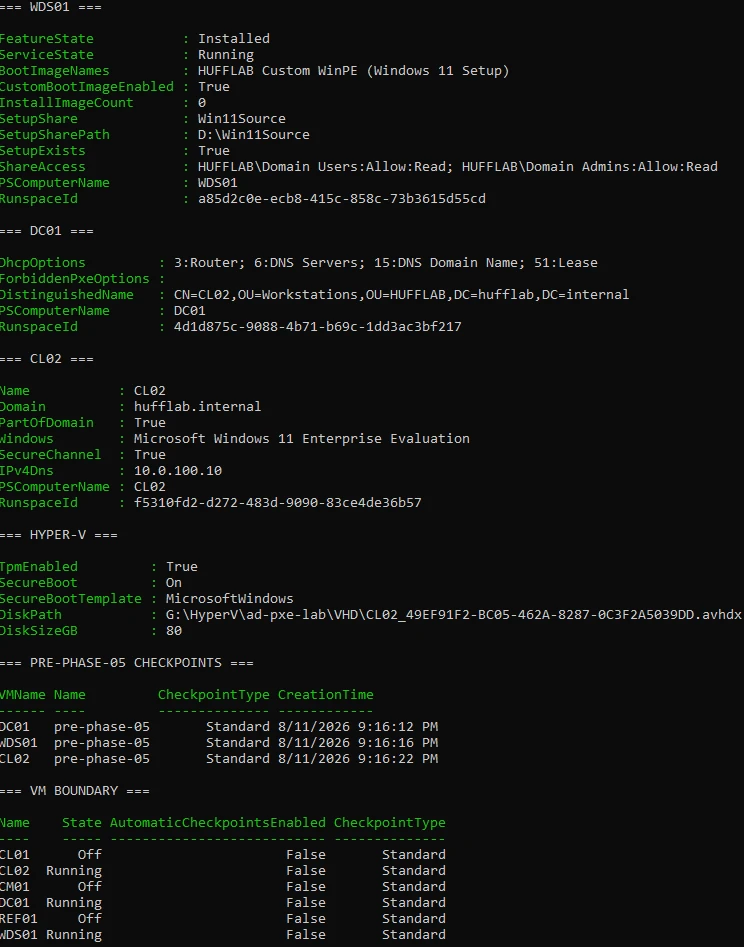
I also created standard pre-phase-05 checkpoints for DC01, WDS01, and CL02 and recorded which other virtual machines were off. Capturing power state alongside checkpoints matters because a snapshot alone does not document the operating boundary. Later work can now begin from a named, reproducible state.
Current status and what comes next
#Phase 4 is complete. The lab now proves a supported custom-WinPE PXE path through WDS, a Windows 11 Enterprise deployment, domain and OU placement, secure-channel health, and domain-user authentication.
The larger lab is not complete yet. Phase 5 adds the Group Policy suite. Later phases cover golden-image capture and deployment, Configuration Manager prerequisites and installation, application and update operations, compliance, and the controlled handoff from WDS PXE to Configuration Manager PXE.
That distinction is important. The current milestone is substantial and independently verifiable, but it is a boundary inside a longer build. The next phase starts from evidence, checkpoints, and a repository that records not only what worked, but why the design changed when the original plan stopped matching current platform support.