Consolidating services made my homelab easier to manage, but it also put more of them behind the same failure point. If the Docker LXC stops working, several household services can disappear together. My recovery plan needs to account for that shared dependency.
The October 18–19 records in my homelab repository give me a starting point: retained source containers, dated backups on the Mac, and specific migration checks. They do not establish a complete disaster recovery exercise. This post separates that evidence from the recovery procedure I still need to rehearse.
What I would be recovering
#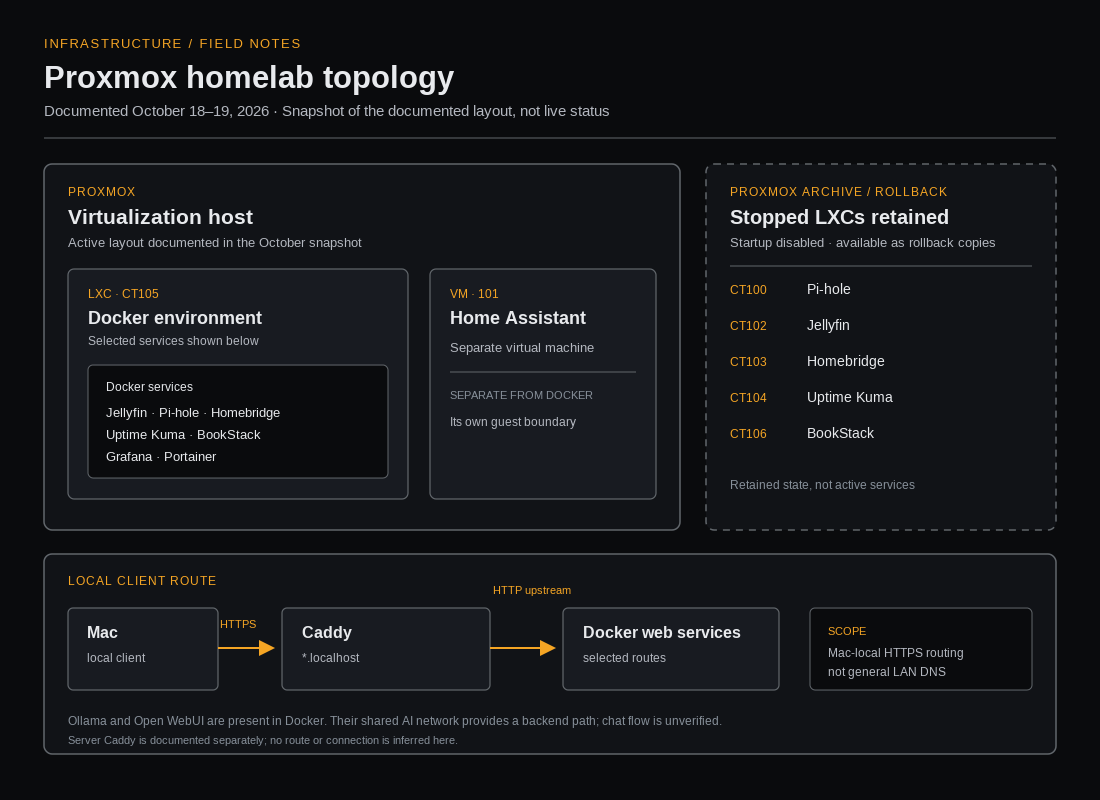
The documented topology puts Pi-hole, BookStack, Jellyfin, Homebridge, and Uptime Kuma in Docker LXC CT 105. Home Assistant remains in VM 101. The five former service LXCs are stopped in Proxmox’s Archive pool with startup disabled; their disks are retained for rollback.
The Mac runs its own Caddy proxy. Friendly *.localhost URLs resolve to the client itself, so they depend on that local proxy. They are not general LAN DNS names that every phone or computer can use.
These boundaries matter during diagnosis. A broken Mac proxy can make a healthy application look unavailable. A failed Docker LXC affects several applications, while a Proxmox host failure also affects Home Assistant. I would identify the failed layer before choosing a restore.
What the backup records establish
#The migration records describe a manual backup copied to the Mac: migration archives, a consistent backup of Docker volumes and deployment sources, and the Mac proxy’s CA and configuration backup. All 35 checksummed files matched. Disposable SQLite restore checks passed for Uptime Kuma, Pi-hole, and Open WebUI.
Jellyfin has a separate later backup with 15 passing checksums and a disposable SQLite restore check covering integrity and retained watched-state records. An Ollama model delta was also saved after the full Docker backup. That later change is not part of the earlier snapshot.
Those are useful checks with limited scope. A matching checksum establishes that a file matches its recorded digest. A database integrity check provides evidence about that restored database. Neither proves that the whole host can be rebuilt or that every application workflow works afterward.
At the recorded inspection, Proxmox had no configured backup jobs, no backups on its configured backup storage, and no ZFS snapshots. There was no recurring backup schedule or retention policy. The stopped LXCs also share the Proxmox host’s storage, so they are rollback options rather than an independent copy for host or disk loss.
The order I would follow
#This is my planned sequence for a recovery exercise. It has not been demonstrated as an end-to-end restore.
- Establish access and scope. Check power, network access, Proxmox, CT 105, and the Mac separately. Keep a private runbook and the credentials needed to reach backups accessible without BookStack or the affected services. Record the last known good state before changing anything.
- Choose and preserve a restore point. Identify which dated archives cover the affected services, verify their checksums, and work from copies. Preserve the failed state when possible. Do not overwrite retained volumes just to see whether an older instance starts.
- Restore the host prerequisites. For host loss, rebuild Proxmox and the required guest configuration before restoring applications. The Docker volume archive alone is not a demonstrated Proxmox or Home Assistant VM recovery. Recovering VM 101 needs its own backup and restore procedure.
- Restore application state deliberately. Match each service’s deployment source, image version, secrets, and persistent volumes. Several live Compose sources are outside the Git checkout. A fresh clone does not include ignored
.envfiles, database contents, or application keys. BookStack also needs its original encryption key and uploaded files. - Restore network dependencies and routes. Prioritize working client DNS, using a documented fallback while Pi-hole is unavailable. Check for port 53 conflicts before starting Pi-hole, then test DNS over both UDP and TCP. Restore Caddy configuration and protected CA state; clients must trust the appropriate public root certificate.
- Bring dependent applications back in stages. Start databases before applications that require them. Verify the real router media mount before starting Jellyfin. Then check each service directly and through its expected proxy route before declaring it recovered.
Compose project names and volume overrides need particular care. A different project name or an incorrect override can attach an empty volume and produce a convincing first-run screen. I would confirm the intended mounts before allowing the application to write.
Checks that go beyond a running container
#For Pi-hole, recovery means a client can resolve names through the intended DNS server. A reachable admin page is only part of that check.
For BookStack, I would verify original-account sign-in, the expected library, and uploaded content. For Uptime Kuma, I would check that the restored monitors point to the intended destinations. Monitoring hosted in CT 105 cannot be my only way to detect failure of CT 105.
For Jellyfin, the router share must be a real CIFS mount, not an empty directory at the same path. The records show read-only SMB 2.0 access and authenticated direct streaming after restart. Automatic mounting after a Proxmox host reboot, visual playback, and transcoding remain untested.
Homebridge needs a device-control check beyond its web UI. Home Assistant needs a separate VM recovery check. The migration records leave Homebridge device control and an authenticated Open WebUI workflow unverified; I would keep those open until I can test them.
Rollback without duplicate services
#The archived LXCs provide another option if a Docker migration needs reversing. Before starting one, I would stop its Docker replacement and confirm the intended addresses and client configuration. Running both instances can create conflicting DNS service, duplicate automation, or two copies of application data that diverge.
An archived source also reflects its cutover state. Returning to it can lose newer changes. I would record that consequence and preserve the newer data before switching back.
The next exercise
#My next step is an isolated restore into disposable volumes, with access restricted so restored DNS and automation cannot interfere with the household. I would record the backup date, restore steps, elapsed time, application checks, and missing dependencies. Only that exercise can turn the proposed sequence into a tested runbook.
Afterward, I need a recurring backup schedule, retention rules, an independent off-host copy, and a separate Home Assistant backup path. Recovery time and acceptable data loss are still targets to choose and measure, rather than results I can claim today.
The private archives contain credentials and application data. They belong in protected backup storage; this public post contains the recovery approach and its evidence boundaries.
The source for the dated observations is the homelab README’s migration and backup record. The lab page shows the documented architecture. Neither is a live availability report.