
My goal for Phase 05 of the Active Directory lab was to set domain password rules, add stronger requirements for an administrator, apply a workstation baseline, and map an HR drive. I finished by checking the saved and effective policies, verifying the client, and recording checkpoints for the next phase. The first wrong turn was especially frustrating: I could see the settings in the editor, but the verifier still rejected them.
This follows my Phase 4 Windows 11 PXE deployment. The Phase 05 runbook gives each control a specific scope:
| Control | Source and scope | Verified settings |
|---|---|---|
| Domain passwords | Default Domain Policy, domain scope | Minimum length 14, complexity enabled, history 24, maximum age 90 days |
| Administrator passwords | PSO-Admins-Strong, assigned directly to adm-lhuff |
Minimum length 16, maximum age 60 days, lockout threshold 5, precedence 10 |
| Workstation baseline | GPO-C-Workstation-Baseline, linked to Workstations OU |
Lab-use banner, 900-second inactivity limit, removable-storage denial |
| HR drive map | GPO-U-IT-DriveMaps, linked to Users OU |
H: mapped to \\DC01\HRShare, targeted to users in RG-HR-Staff |
The password settings object (PSO) supplements the domain policy for its assigned administrator. The drive-map GPO reaches the Users OU, while item-level targeting selects the HR group.
The setting was there. The GPO was wrong.
#The first check returned PASS. The next one failed. The host preflight confirmed that Windows and Hyper-V were ready. Then the configuration verifier reported that the workstation GPO was missing its Security Options template, GptTmpl.inf. The PASS was only a readiness check. It said nothing about whether I had put the policies in the right places.
My first reaction was, “I can see it in GPO.” The settings were visible in the editor, and gpupdate had completed successfully. Then I noticed the editor was rooted at Default Domain Policy. The verifier was checking GPO-C-Workstation-Baseline. I had found the settings, but in the wrong policy.
I first remembered this as a password-complexity mix-up between the domain and workstation policies. The evidence points to a different placement error. In this lab, domain password length, complexity, history, and age belong in Default Domain Policy. I had edited workstation Security Options there instead. The earlier GPMC view recorded the logon banner and 900-second inactivity setting in Default Domain Policy, while the workstation baseline lacked the expected security template. I put those workstation settings in GPO-C-Workstation-Baseline, linked to the Workstations OU. The domain password settings stayed in Default Domain Policy.
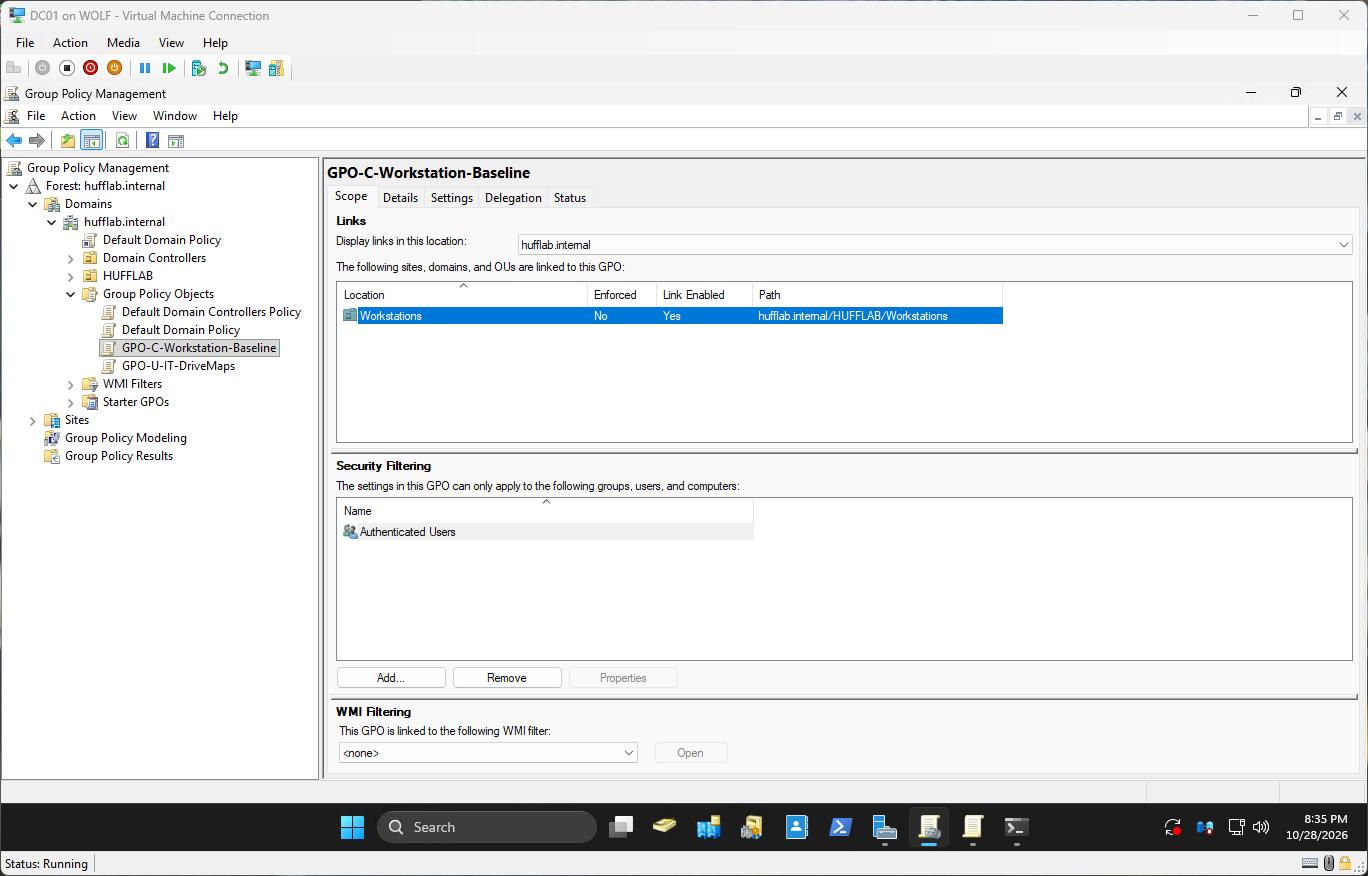
That gave me a better check to use next time: confirm the exact GPO name and GUID, and confirm its link, instead of treating a visible setting or successful policy refresh as proof that the intended GPO is configured and applied.
The details that slowed verification
#The banner title was “HUFFLAB - Authorized Lab Use,” with an ordinary hyphen. I accepted that as the intended punctuation, and the verifier needed to accept it too. It was a separate issue from the missing Security Options template.
Collecting evidence caused a separate error. Copy-Item through PowerShell Direct failed because the copy helper encountered a missing Length property. The remote session had retained strict-mode behavior. I temporarily disabled strict mode for the transfer, then restored it. The copy failure alone did not tell me whether the policy had applied.
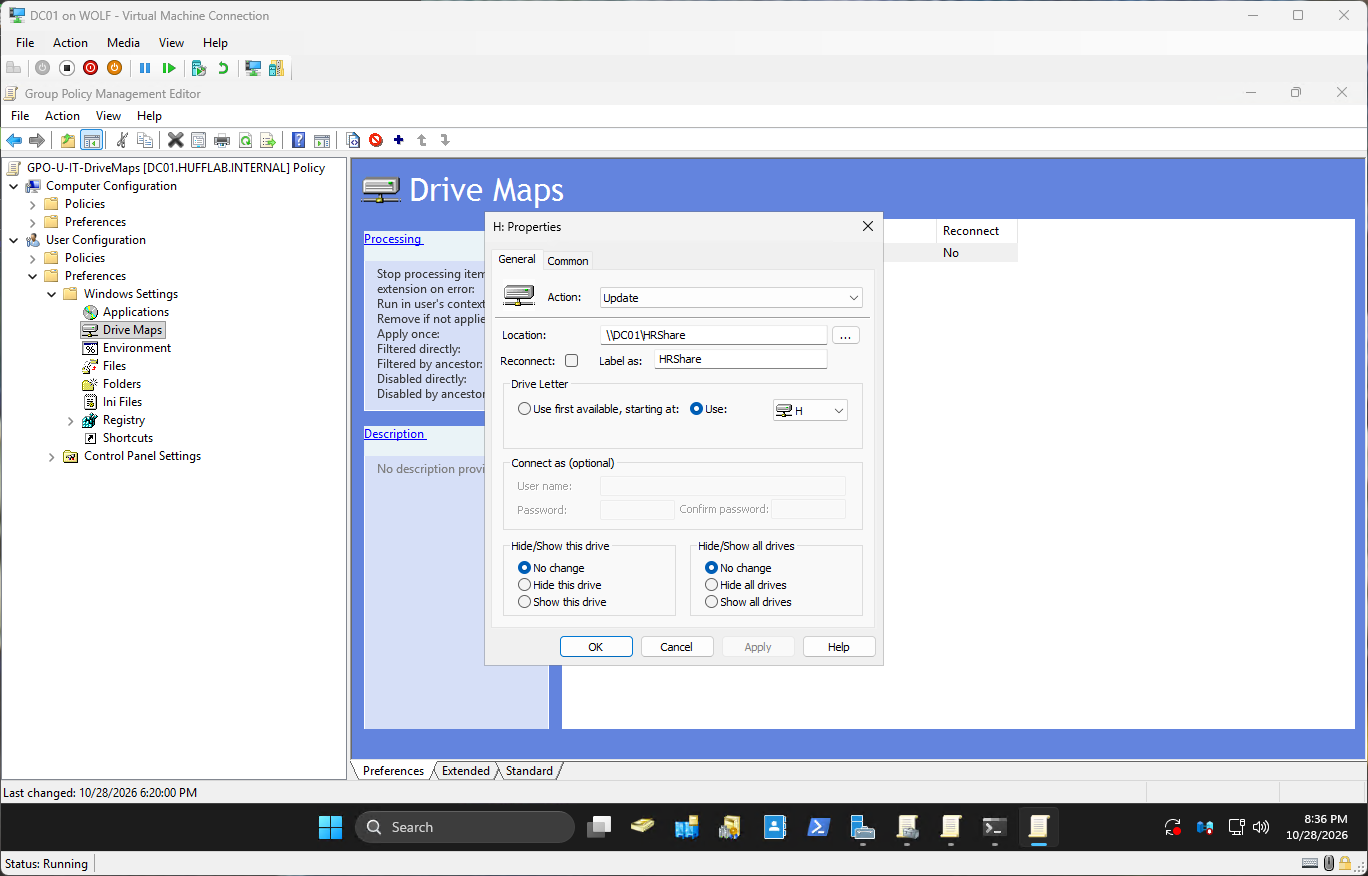
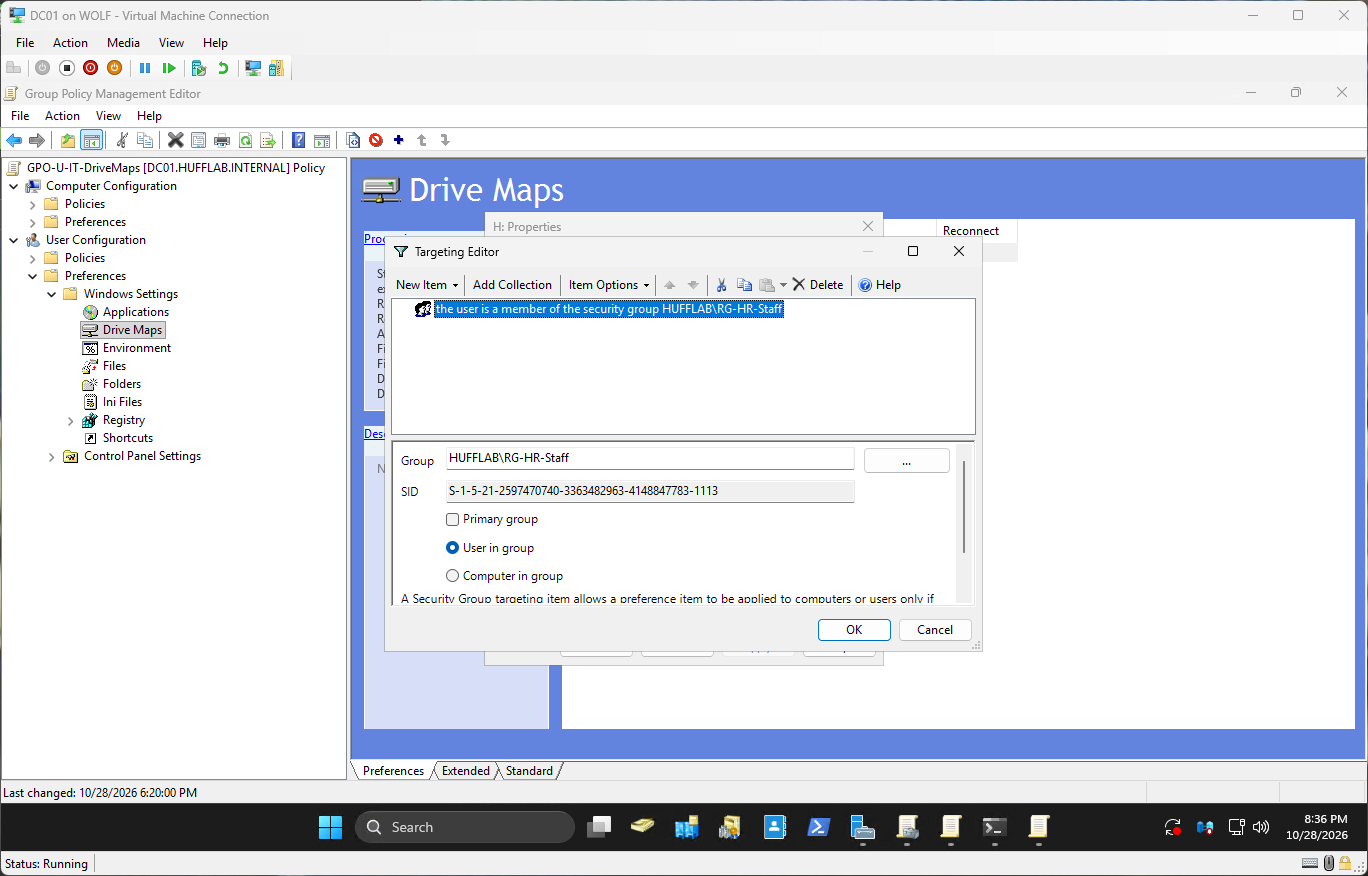
The HR drive map needed its own cleanup. GPO-U-IT-DriveMaps is linked to the Users OU. Its final item used Update to map H: to \\DC01\HRShare, with one positive user-membership target for RG-HR-Staff. Extra test targeting caused an earlier rejection. The configuration verifier expected one target, and the evidence shows that target with the mapping properties.

What counted as finished
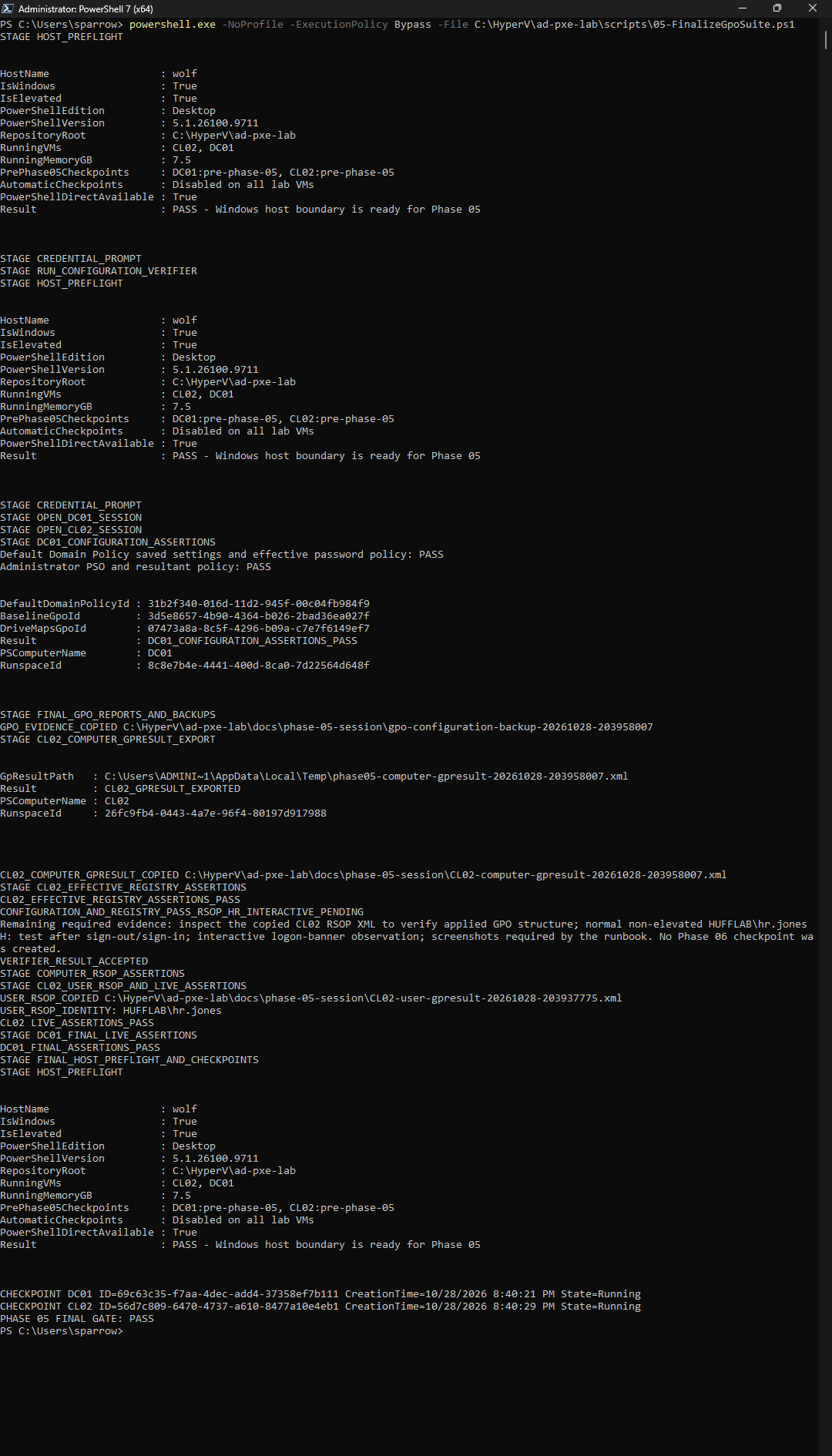
#A configuration PASS was not the final gate. The finalizer checked the saved policy and effective client registry settings, fresh computer and user resultant-policy (RSOP) reports, domain membership, DNS, the secure channel, and required domain-controller services. That gave me checks of both the configured policies and the results on the client.
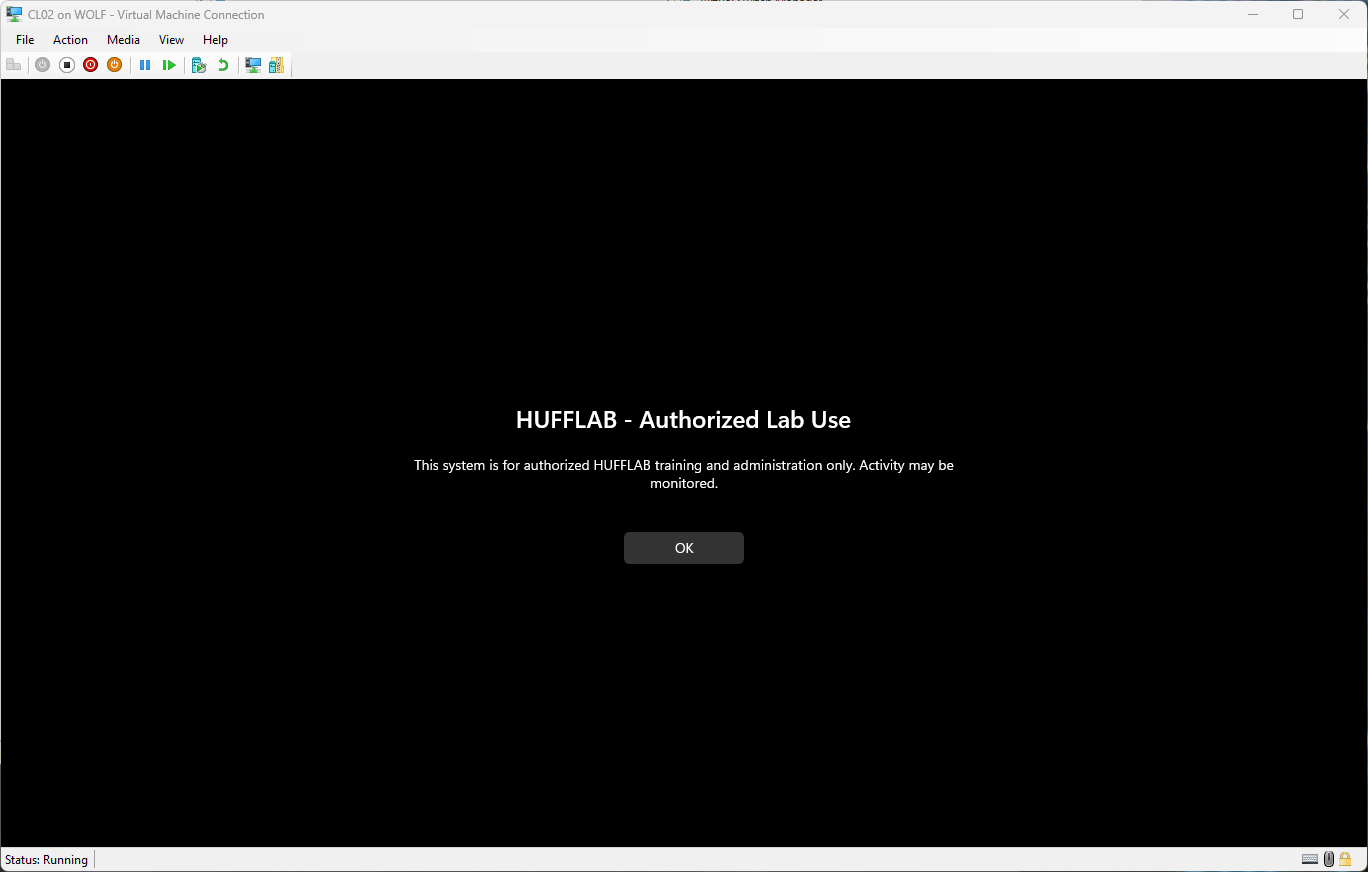
I signed in to CL02 as the normal HR user, hr.jones, in a non-elevated session. Using a different administrator would have changed the identity under test. The console showed the expected user, H: pointing to the HR share, successful access, and the applied drive-map GPO. I also saw the logon banner on CL02.
The curated user-session transcript includes these checks:
PS C:\Users\hr.jones> whoami
hufflab\hr.jones
PS C:\Users\hr.jones> Get-PSDrive H | Select-Object Name,Root,DisplayRoot

Name Root DisplayRoot
---- ---- -----------
H    H:\  \\DC01\HRShare

PS C:\Users\hr.jones> Test-Path H:\
True
The user’s gpresult lists GPO-U-IT-DriveMaps as applied. Since a mapped drive alone does not prove share access, I checked access separately.
The final gate passed on October 28, 2026, at 8:40 p.m. EDT. DC01 and CL02 each received a verified Standard pre-phase-06 checkpoint. They were the only running VMs and used 7.5 GB total; automatic checkpoints remained disabled. I now had a recorded boundary for the next phase.
That result has limits. I verified the removable-storage denial and inactivity settings, but I did not test a physical USB device or wait through the 900-second inactivity period. Those behavior tests required a safe lab window. The settings passed verification; the behaviors remain untested.
Review caught problems with repeating the run
#The successful lab run still left two problems for the next run. Review of PR #6 found that the finalizer embedded this session’s custom GPO identifiers. Restoring the earlier checkpoint and recreating the policies would generate different IDs, so a correctly rebuilt suite could fail finalization. The prerequisite helper also assumed its ignored session directory already existed, which would stop logging on a fresh checkout.
Commit 8f5b9bab changes the finalizer to use the current identifiers returned by the validated GPO inventory and creates the session directory before the first log write. The recorded follow-up checks cover generated IDs, rejection of stale IDs and invalid policy results, fresh and existing log directories, and Windows PowerShell 5.1 parsing.
Those checks did not repeat the live finalizer or create new checkpoints. The 8:40 p.m. PASS remains the result of the original lab run. Both review threads were resolved, and PR #6 merged on October 28, 2026. A successful run, a repeatable helper, and a completed review are separate milestones.
The completion record and curated evidence index document this run. Raw RSOP and GPMC exports, policy backups, recovery material, credentials, and local receipts remain outside the published evidence.